
Does the title ring a bell? I bet it does. It must remind you of the article i wrote quite some time ago titled “Get rid of the sociable plugins. Do it yourself!“. It helped a lot of people save some CPU time and memory usage. Now it’s time for the newsflash! The idea came to me after i read this article on a modification for the theme. It actually gives a very nice little admin area on the theme options but it fiddles with the database so i decided to show you how you can do the same thing without any query run.
Firstly, i will summarize all the steps we are going to take in order to achieve this:
- We will have a plain text file called “newsflash.txt” in our theme folder. This file will actually contain the newsflash we want to display to the visitor. If it’s empty, or not there at all then nothing will be shown.
- On the “index.php” file of our theme we will be adding a few extra lines of code that will actually do just that. Check for the existence of the file and if it’s there and has things in it, then a newsflash div will be rendered before the posts do.
- Skin the newsflash div box through the style.css file.
The result will look something like the following.
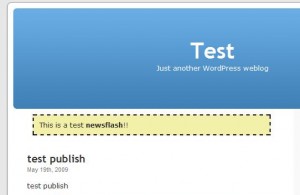
Time to get our hands dirty. First of all create a new file called “newsflash.txt” on the home folder of your currently used theme. Then, open the file index.php (or home.php in some themes) and find the place where the loop begins. That usually is just before a line looking like this:
<?php while (have_posts()) : the_post(); ?>
Right before that line inject the following snippet of code:
<?php if (file_exists(TEMPLATEPATH.'/newsflash.txt')):?>
	<?php $newsflash_contents = file_get_contents(TEMPLATEPATH.'/newsflash.txt');?>
	<?php if(!empty($newsflash_contents)): ?>
		<div class="newsflash">
			<?php echo $newsflash_contents; ?>
		</div>
	<?php endif; ?>
<?php endif; ?>
Let’s take the code line by line here so you can understand what’s going on.
- On the first line the check for the existence of the file is made. If it’s not there, then the whole code segment is not executed, thus nothing is displayed.
- Second line loads the contents of the file into the variable “newsflash_contents“.
- Third line checks if the variable is empty. If it is, then it means that the file had nothing in so no newsflash to display.
- Four through six display the newsflash.
Now let’s move onto the CSS part. Open the style.css file (or any file that is your theme’s stylesheet) and add the following lines at the bottom:
div.newsflash {
	margin: 10px;
	border: 2px dashed black;
	background: #F3F0A9;
	padding: 10px;
}
This will render a dashed yellow box with the newsflash. A few notes here:
- The newsflash text can contain HTML since it’s plainly rendered out. So, essentially, you can put just about anything in there.
- Using your imagination and design skills you can do almost anything with it. You can add an exclamation mark image if you want to drive attention or color / skin it accordingly to fit your theme.
I would like to say that it’s much more preferred to load the newsflash from file rather make a query to the database. Ofcourse it also depends on your needs. If you need complicated management of newsflashes then this is probably not a method for you. On the other hand, if you have basic newsflash needs this is the way i’d recommend. And, as always, if you have trouble implementing, let me know and i’ll do my best to troubleshoot and help you out!
this is just so much better than the original post. I will surely try this out this weekend. to be honest, I was completely blacked out when I read the original article. But tell me this, in case I have nothing in the text file, will that box be still there in the homepage?
@Raju: Nope! As i you can see line 3 of the code checks to see if the file was empty. If it was then nothing is displayed! Check it out and let me know how it works for you!
Brilliant. Just what I was looking for. As an affilate marketer, this is a perfect way to put a sale item alert on top of all posts for a given number of days without it dragging down the DB.
Thanks a bunch
as a side note, I had to edit the single quotes around the newsflash.txt to get this to work. Copy and pasting threw in some odd quotes that were not being processed. Edited them separately using my keyboard and it all worked
@Rob: Yah this is actually a problem with my stupid code highlighter. I’ve had that forever and every know and then some poor visitor get’s caught on it. Welcome to the club 🙂 Nice to hear it all worked nice for you!
Can only one newsflash be in the text file or can it rotate through multiple lines? I know we talked about me doing something like that for my testimonials. Of course, I haven’t worked on it yet 😉
@Kim: Huh… Now you gave me an idea for a next article improving this one 😉 The way it is coded now it will directly outputs whatever is in the text file. It needs a little modification to have multiple newsflashes. I guess you will have to stay tuned for that one 🙂