
I remember my self when i first stumbled uppon a site that on the login link it would blur the site and “popup” the login form. That was neat i must admit. Yesterday i was talking with my friend #FN$# and he was asking how he can show an image over a link when hovered. This second one is somewhat a part of the first one.
When you place a component on the page you are creating, most of the time, you define either a margin or a padding for it. You might also define a width and a height.
But these values are relative to the other components and the place of the thing in the page. So, by default, when you create any object (that is a DOM object i.e. a tag such as div, p etc) there is a position attribute that is set to “relative”. In other words, one could say, the css attribute looks something like “position: relative”. This gives exactly that meaning, that the object placed should be put relatively to the other ones. Now, imagine a situation where you know for sure that an object, let’s say a div, will be placed 200px down and 250px right of the beggining of the page (top left corner). This is an absolute position since you are “absolutely” sure where this component will be placed (absolute ofcourse does not come from absolutely but from the absolute position declared rather than the conventional relative one). To do that you would need something like the code below:
<div style="position: absolute; left: 250px; top: 200px;">absolute context</div>
This is it! Now let me clear of one thing. This div, wherever placed, it doesn’t matter since when the browser sees it, it won’t put it where found but on the place defined by the absolute coordinates.
Now, another thing to tackle is how to show things uppon rollover. Well, on every tag there is the attribute “display”. Two possible values, the ones that interest us, are “none” and “block”. When we set the display to none on an element then this element is not shown at all. When set to block it is visible.
Putting those two things together we can have this small snippet below. What it does is that it displays “hello” on a div when we rollover the “say hi” link.
<html>
<head>
<script>
function show(){
	document.getElementById("hello_msg").style.display = "block";
}
function hide(){
	document.getElementById("hello_msg").style.display = "none";
}
</script>
<style>
div.msg{
	position: absolute;
	top: 50px;
	left: 20px;
	display: none;
}
</style>
</head>
<body>
<div class="msg" id="hello_msg">Howdy there!</div>
<a onmouseover="show();" onmouseout="hide();" onclick="return false;" href="#">Say hi</a>
</body>
</html>
Now, if you try this out, you will see that the message appears below the link although the div is set before it. This is because it has an absolute position 😉
Next on our list is the so called Z index. In the 3D world we have three axis. The x the y and the z. This is what happens exactly on a browser. Take a quick look at the image below.
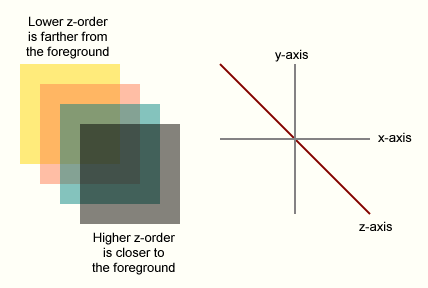
As you can see the x and y axis define what we know when we set the margins, paddings etc and the Z axis actually defines the “depth” of the component. In other words, a div, for instance, with a z index of 2 will be shown bellow a component with a z index of 3. So simple!
All there is left is to combine the knowledge above in order to answer the two points mentioned in the beggining. Starting from the simple one, the one that #FN$# wants to do. Let’s say we have a link and we want to show an image over it when the cursor hovers. Here are the steps we need to take:
- Have a div for each link with the images we want to display with a “display: none” style.
- We also need to set the z index of the tag to something big, let’s say 10. (“z-index: 10;”)
- On the links add a “onmouseover” and “onmouseout” event.
- On the “onmouseover” we need to do the following: a) locate the cursor’s place. This can be done with a simple script like the one below. Afterwords, set the top and left attributes of the hidden div to just below the cursor. Then show the div by setting the display to block.
- On the “onmouseout” one we just need to hide the div by setting the display to none.
To locate the position of the cursor adapt this simple javascript to your own needs:
window.onload = init;
function init() {
  if (window.Event) {
    document.captureEvents(Event.MOUSEMOVE);
  }
  document.onmousemove = getXY;
}
function getXY(e) {
  x = (window.Event) ? e.pageX : event.clientX;
  y = (window.Event) ? e.pageY : event.clientY;
  document.getElementById("foo").innerHTML = x+":"+y;
}
It was simple wasn’t it?
Now, on the second matter. To blur the background we go into some kind of trick. What is actually done is that a div is created with a high z-index that actually covers the whole screen and the opaque is set to let’s say 50%. The color is set to black. See where i am going? It’s like a sheet over the page. Then, the form we want gets an even higher z-index and starts placing it’s self. So, let’s say we have a link that we want to do that for. Here is what we need to do.
- Create a div that has a background color of black (or whatever you want) and set the opaque to something less than a 100%.
- Set the z-index of the “sheet” div to something high, let’s say 50.
- Create a div that will hold the “popup” content and set a z-index to something higher than the “sheet”, let’s say 70.
- When we want to show them we need to adjust the sheet’s size in order to cover the whole screen. There is a script example here that can help you do all the blurry effect.
- Then just show both the sheet and the over content.
- To reverse all we need to do is just set the display property to none on both of them.
Simple but neat huh? There is a bit of javascript involved, especially on the second one i know. I need to strike your attention to one thing. When you write such stuff make sure you test on many browsers and many versions of them since some properties might not be fully implemented or as expected!
From here on it’s your imagination fellas! Play around and i am sure that your skills will produce some very good results. I hope this post helps you and especialy my friend #FN$# 😉
For any problems, suggestions errors etc as always leave me a comment!
Inteersting.. will surely give it a try..
cool man…but don’t you think plugin of jquery and other will be more easier to use…
Thank you!!!!!
I’m going to try this NOW!!!!!
@pc & #FN$# try it out and if you have a prob let me know…
@roshan definitely easier but as you know i am somewhat of a masochist 🙂 but yes jquery is easier than any of this
OK,as usual.I couldn’t be #FN$# if haven’t so many problems…
Anyway,I have a question.It may sound stupid but,what exactly happens here??
<>
I think that with this <> you get the <>.
But with this???–> <>
What is <>??
/\ That’s exactly what I mean…
||
||
actually & lt; and & gt; (without the spaces) are the html codes for < and >. where did you see them?